Download DagenDoen 2.0 free on android
APK file Dag!enDoen! 2.11How to install APK / APKS / OBB file on Android
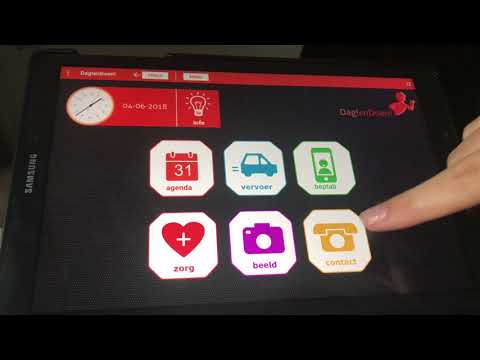
Dag!enDoen! is an app for (in principle) seniors with a daily overview of activities in participating municipalities. In addition to the overview of the day, the activities for the coming days can also be viewed.
Participants of Dag!enDoen! can register for activities every day and indicate whether they need transport to get to the desired activity. They create an account for this.
Viewers of Dag!enDoen! (such as informal carers and home care workers) can see the activities in the desired municipality every day, but cannot register for activities and transport. An account does not need to be created for this.
Installation:
During installation, you will be asked to give permission to enable the camera & microphone. This is necessary to be able to use the 'digital living room'.
Together against loneliness
V2.11 - August 1, 2024
Minor bugfixes
V2.10 - November 28, 2023
Minor bugfixes
V2.9 - November 9, 2023
Minor bugfixes
V2.8 - October 23, 2023
Added 2FA support for Google login.
Minor bugfixes
V2.7 - May 10, 2023
Added support for Google login.
- LicenseFree
- File nameDag!enDoen!
- File Version2.11
- Package namecom.dagendoen.nl
- Size5.59 MB
- UploadedFebruary 16, 2025
- Android5.1 or later

- CategoryEvents
- DeveloperWebshade
- Developer sitehttps://www.webshade.nl
- Developer emailinfo@webshade.nl
- md5 hash219b21e069c584fb982aed1b40fa142c
- Architecture-
- Permissionsshow (17)

